 Find a calculator ↗
Workflow Automation ROI: Separate Time Released from Real Business Benefit
Workflow automation ROI compares the benefit of a changed process with the cost of implementing and running it. The important step is deciding how much saved time becomes a defensible benefit, rather than treating every released minute as cash savings.
Before the spreadsheet: prove the time saving on a small sample
Imagine a team processing supplier requests. A demonstration shows a request being completed in three minutes instead of eight. That is promising, but it leaves an important question unanswered: was the demonstration typical?
Take a sample that includes the requests your team actually handles. Include incomplete submissions, unusual attachments, duplicate requests, and cases that require approval. Record total human handling time for each case. Keep waiting time in a separate column.
Build a baseline the team can reproduce
For each sampled task, record the task type, the staff minutes used, whether a correction was needed, and whether it finished successfully. Apply the same method before and after the change. If the after sample contains only the easiest cases, the comparison will exaggerate the benefit.
Use the total minutes divided by completed tasks for a volume-weighted average. Also inspect the difficult cases separately. An average of three minutes can conceal a small group of exceptions that repeatedly interrupts a senior employee.
Do not make the model more precise than the evidence. If timing is based on rough interviews, keep a range and say so. A measured pilot can narrow that range later.
Measure the process before choosing the benefit
Count tasks that follow the same workflow. Then estimate the total staff handling time before and after the change. Include review, corrections, and exception handling in the after figure.
Elapsed processing time and staff effort are different. A task that waits in a queue for two days may require only ten minutes of employee work. Do not value two days of waiting as two days of labor saved.
Use a representative sample. A demonstration with unusually simple tasks can make the time reduction look better than normal operating conditions will allow.
Decide how released time will be used
A team may finish work faster without reducing payroll. That can still be valuable, but the benefit needs a clear explanation: avoiding overtime, reducing contractor work, handling a backlog, or creating useful additional capacity.
The calculator uses a realization share to limit the amount of released-time value counted as benefit. A 50% share means you are recognizing half of the modeled time value, not claiming that half of the staff will leave.
- Identify the work that will be reduced or redeployed.
- Avoid counting both labor savings and the full value of the same added capacity.
- Include ongoing supervision and exception costs.
- Keep quality benefits separate unless you can value them without overlap.
Build a bridge from released hours to a benefit you can defend
The base example releases about 83 hours a month. Before valuing those hours, write down where they will go. A scattered five-minute saving across many people is harder to redeploy than a predictable block of time in one team.
| Benefit type | Evidence to look for | How to describe it |
|---|---|---|
| Cash reduction | A canceled contractor commitment or reduced overtime | Expected spending reduction, with timing. |
| Capacity | A backlog or additional work the team can take on | Hours available for productive work; cash is not assumed. |
| Service improvement | A measured change in turnaround or error handling | An operational outcome, valued separately if supported. |
If your plan relies on redeployment, name the work and its owner. “The team will be more productive” is too vague to check. “The operations team will use the released block to clear a defined backlog” is a testable assumption.
Keep benefits mutually exclusive. If avoided rework is already included in the lower after-automation handling time, do not add the same rework cost as a second benefit.
Worked example: a recurring administrative workflow
| Input | Assumption |
|---|---|
| Tasks per month | 1,000 |
| Minutes before / after | 8 / 3 |
| Loaded hourly cost | $30 |
| Realization share | 60% |
| Monthly automation cost | $400 |
| One-time setup | $6,000 |
The workflow releases 1,000 × (8 − 3) ÷ 60 = 83.33 hours per month. At $30 per hour, that is $2,500 of potential time value. Recognizing 60% gives a monthly valued benefit of $1,500.
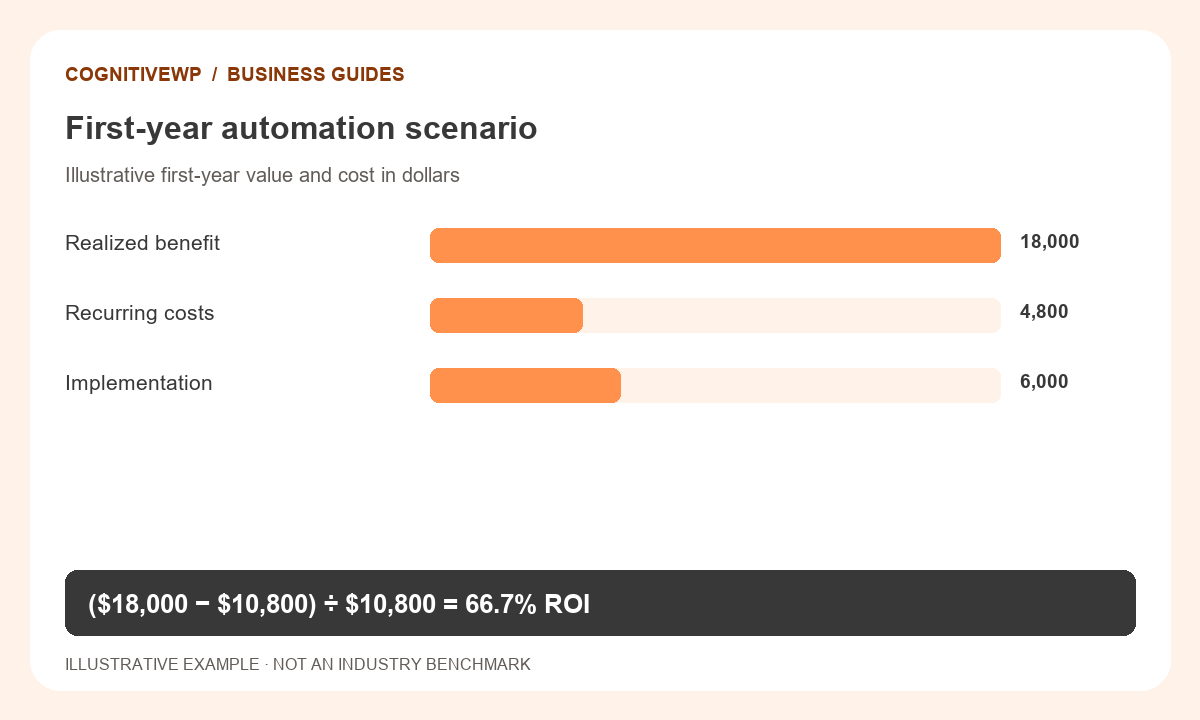
Annual benefit is $18,000. First-year cost is $4,800 in recurring charges plus $6,000 setup, or $10,800. Net first-year benefit is $7,200, giving an ROI of about 66.7%.
Monthly net benefit after recurring cost is $1,100. Simple setup payback is $6,000 ÷ $1,100, or about 5.45 months, assuming steady benefits start immediately.
A more realistic first year: allow for adoption and setup time
The steady-state example assumes twelve full months of benefit. A project that starts producing results in its third month has only ten benefit-producing months in that first year.
Keep the same $1,500 monthly benefit, $400 monthly running cost, and $6,000 setup cost. Suppose recurring charges are paid for all twelve months, but benefit starts in month three. First-year benefit becomes $15,000. First-year cost remains $10,800. Net benefit is $4,200 and ROI is about 38.9%, rather than 66.7%.
That difference comes entirely from timing. Neither scenario needs a different formula; they need different assumptions about when the formula applies.
What happens at lower volume?
At 600 tasks a month, the same five-minute saving releases 50 hours. At $30 per hour and 60% realization, monthly benefit is $900. After the $400 running cost, monthly net benefit is $500. With twelve full benefit months, first-year net benefit is zero after the $6,000 setup cost.
This gives the team a useful question: is 600 tasks a reliable floor, a seasonal low, or an optimistic forecast? Fixed software costs make volume especially important.
Test a less favorable scenario
If only 30% of the released time becomes useful benefit, monthly benefit falls to $750. First-year benefit becomes $9,000 while cost stays $10,800. First-year ROI is then about −16.7%.
This does not mean the system never pays back. It means the first-year benefit is lower than first-year cost under that scenario. Ramp-up time, adoption, and task volume can all change the result.
Simple payback ignores the time value of money and later cost changes. Treat it as a screening measure, not a complete investment appraisal.
Plan the evidence you will collect after launch
- Record baseline task volume and staff handling time.
- Include implementation, training, and transition effort in setup.
- Track review and exception time after launch.
- Check whether the planned benefit was actually realized.
- Update the model when pricing or workflow volume changes.
A positive result based on uncertain inputs is a reason to test the workflow, not proof that it will succeed. Start with a defined process and a measurable outcome so the estimate can be compared with reality.
Use a short decision memo, then check the result after launch
Put the proposal on one page: workflow, baseline, expected change, cost scope, benefit owner, and conditions that would make the estimate fail. Attach the detailed calculations so the headline can be traced back to its inputs.
- Proceed to a pilot when the process is stable enough to measure and the largest assumptions can be tested.
- Revise the scope when exception handling consumes most of the expected saving.
- Pause the proposal when there is no defensible use for the released time or no owner for operating the system.
After launch, compare actual task volume, handling time, exception effort, and recurring charges with the original estimate. Explain the differences instead of quietly replacing the baseline. A useful ROI model becomes a record of what was learned, not just a number used to win approval.
Frequently asked questions
Are time savings always payroll savings?
No. Payroll may remain unchanged. Count cash reductions only when supported, and label productive redeployment or capacity benefits separately.
What belongs in setup cost?
Include integration, configuration, testing, training, and transition effort attributable to the change. Avoid duplicating costs already included in recurring charges.
What if the automated process takes longer?
The time benefit may be negative. Investigate the cause rather than forcing the model to show savings; other benefits would need separate evidence.
Why can payback look reasonable while first-year ROI is negative?
A project can recover setup costs over a period longer than one year. The two measures answer different timing questions.
Can I include fewer errors as a benefit?
Yes, in a separate documented model if the improvement and its cost impact are supported. Do not count avoided rework twice in both time savings and error savings.
Related calculators and category
Find a tool for your next business decision
Explore free calculators to compare costs, capacity, and planning assumptions.