 Find a calculator ↗
How to Calculate Purchase Order Processing Cost
Purchase order processing cost measures the administrative resources used to handle a purchase order. It is separate from the price of the goods or services being purchased.
Set the beginning and end of the process
The value printed on a purchase order is not the cost of processing it. Processing cost is the time and operating expense needed to move the order through a defined workflow.
Decide whether your process begins with a complete requisition, an approval request, or the creation of a purchase order. Decide whether it ends when the order is sent, acknowledged, or reconciled.
These boundaries determine which work belongs in the numerator.
A practical starting checklist
- Choose where the workflow starts and ends.
- Count the POs handled in one reporting period.
- Measure active staff time, including separately tracked exceptions.
- Add only the operating costs assigned to that workflow.
- Divide the total by the matching PO count.
Keep sourcing projects, contract negotiation, invoice payment, and warehouse receiving outside a narrow PO administration estimate unless you deliberately include them. APQC distinguishes procurement and ordering measures, which is a useful reminder that costs from differently defined processes are not directly comparable.
Decide what belongs in your processing cost
| Include when in scope | Track separately | Why it matters |
|---|---|---|
| Creating and checking the PO | Price of purchased goods | The purchase amount is not administrative effort. |
| Active approval and correction work | Time waiting for approval | Elapsed time is not automatically labor time. |
| Assigned software and support costs | Unrelated platform functions | A shared subscription should not be charged in full to every process. |
| Additional exception handling | Exceptions already in average handling time | Otherwise you charge for the same work twice. |
A simple time log is often more useful than a precise-looking guess. Record the order type, active minutes, and reason for additional handling.
Include straightforward orders as well as difficult ones. A sample made up only of problem cases will not represent normal workload.
Worked example: 300 purchase orders in a month
| Component | Calculation | Cost |
|---|---|---|
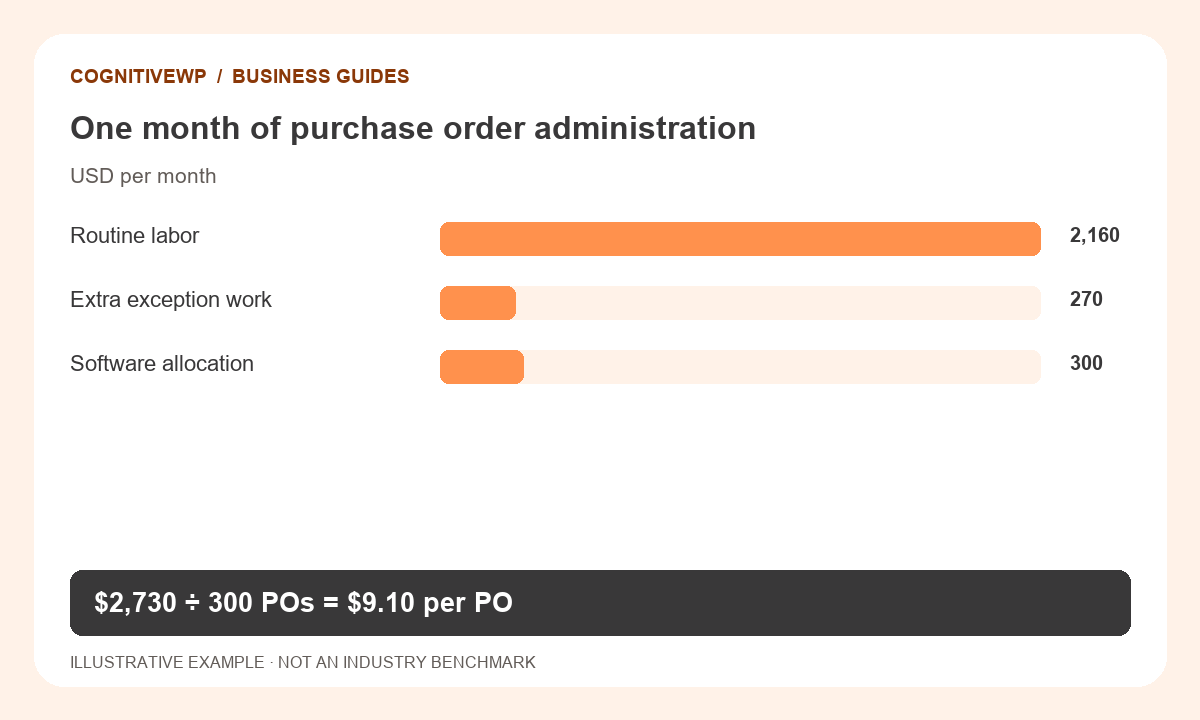
| Routine handling | 300 × 12 minutes ÷ 60 × $36 | $2,160 |
| Additional exception work | 30 × 15 minutes ÷ 60 × $36 | $270 |
| Assigned software cost | Monthly allocation | $300 |
| Total processing cost | Labor + operating allocation | $2,730 |
$2,730 ÷ 300 = $9.10 per purchase order.
The 30 exception orders are part of the 300 total orders. Their 15 minutes are additional to the routine 12 minutes, so the example does not count the same work twice.
All figures in this worked example are illustrative, not recommended prices or industry benchmarks.
Try it with your own figures
Open the Purchase Order Processing Cost Calculator. Check the field definitions and use figures that match the tool’s scope.
Separate routine orders from exceptions
A single average can hide the reason costs are rising. Track standard orders, missing-information cases, changes after approval, and emergency orders separately where practical.
For each segment, record the number of orders and the active time needed.
If your observed average already includes all correction work, do not add an exception allowance again.
Similarly, count a revised order once or multiple times according to a documented rule, and keep that rule stable when comparing months. Otherwise an apparent improvement may simply reflect a changed denominator.
Translate time savings into an operational decision
Reducing routine work from 12 to 8 minutes across 300 POs releases 20 labor hours per month.
At the example rate, that is $720 of modeled capacity value. It does not automatically reduce payroll by $720; employees may use the released time for other work.
For an automation proposal, compare that capacity benefit with recurring software costs, implementation effort, training, and ongoing review. Confirm that accuracy and approval controls remain appropriate.
A faster workflow is only useful if it produces correct orders and preserves the business’s required checks.
Keep cost, capacity, and cycle time on one scorecard
Cost per PO explains resource use. Orders per available staff hour describe capacity.
Request-to-release time explains how long the requester waits. Review these measures together instead of asking one number to explain the entire purchasing process.
Use the processing-cost calculator to model your own workflow, then use the administration-capacity calculator to test whether the team can handle expected demand. Recheck the assumptions against actual volumes and recorded time after a busy month or a process change.
What to do next
- Review exception causes before buying automation.
- Separate released staff capacity from actual payroll savings.
- Track processing cost, capacity, and elapsed cycle time together.
Frequently asked questions
Is the purchase order amount included?
No. The amount paid for goods or services is separate from the administrative cost of processing the order. Combining them makes it difficult to understand process efficiency.
Should I measure cost per PO or per line item?
Choose the unit that matches your decision. An order with many line items may require more work than a single-line order. Report both when order complexity varies substantially.
Does approval waiting time count as labor?
Only active work belongs in labor time. Waiting still matters, but it belongs in an elapsed cycle-time measure unless someone is actively working during that period.
Does automation create cash savings immediately?
Not necessarily. Saved staff time may create capacity rather than reduce cash spending. Include implementation and ongoing costs before making a financial claim.
What if no orders were processed?
Cost per PO is undefined when the denominator is zero. Report the period’s fixed administration costs separately rather than dividing by zero.
Sources and further reading
The resources below support the definitions and context discussed above. The worked examples and illustrations are original CognitiveWP planning scenarios.
Related calculators and category
Find a tool for your next business decision
Compare your own costs and assumptions with free, easy-to-use business calculators.