 Find a calculator ↗
How to Calculate Cleaning Labor Hours from Square Footage
A cleaning labor-hours estimate turns a defined cleaning scope into a staffing plan. Start with cleanable area and a task-specific production rate, then add work that a floor-area rate does not cover.
Measure cleanable area instead of relying on building size
Square footage is a starting point. The cleaning scope tells you how much work is actually required.
A property’s advertised square footage may include spaces that are not in the contract.
Walk the facility or use a reliable floor plan to identify the areas actually serviced. Document exclusions such as tenant storage, restricted rooms, and spaces cleaned by another contractor.
A practical starting checklist
- Measure the cleanable area included in the contract.
- Match each task to an appropriate production rate or timed allowance.
- Add support time that is not already in the task estimate.
- Total the worker-hours.
- Check whether the crew can divide that work within the available visit window.
Break the area into tasks and surfaces. Vacuuming an open office, cleaning a restroom, and detailing a kitchen involve different work.
Applying one floor rate to every room can hide important differences in fixtures, congestion, soil levels, equipment access, and required quality.
Use the right measuring unit for each task
Not every cleaning task should be estimated from floor area. Use the unit that best explains the work.
| Task or activity | Useful starting unit | Important qualification |
|---|---|---|
| Open-area floor cleaning | Cleanable square feet | Rate must match the surface, equipment, and task. |
| Restroom detailing | Fixtures and observed minutes | Floor area alone misses much of the work. |
| Setup and pack-down | Minutes per visit | Include once, not once per room. |
| Periodic specialist work | Separate task and frequency | Do not silently include it in routine nightly work. |
If your production rate already includes trash removal or another task, do not add that task a second time.
Keep a written scope beside the calculation. It is the easiest way to spot gaps and overlaps.
Worked example: an office cleaning visit
| Work | Calculation | Worker-hours |
|---|---|---|
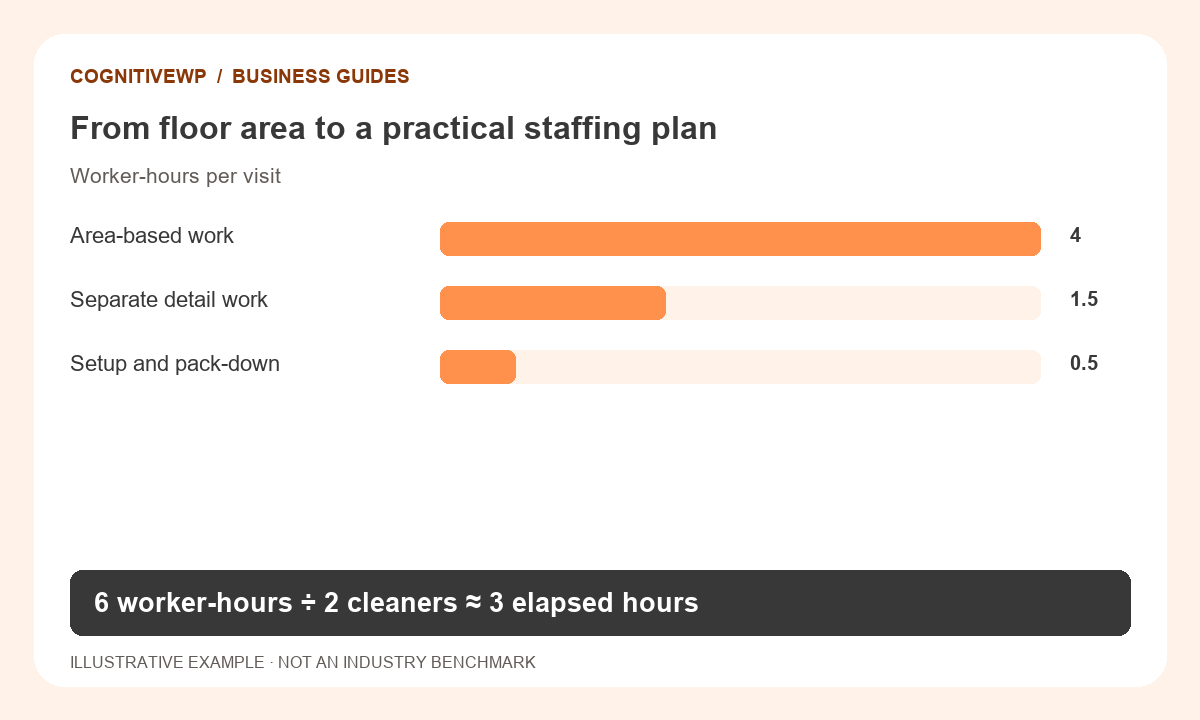
| Area-based cleaning | 12,000 sq ft ÷ 3,000 sq ft/hour | 4.0 |
| Separately timed detail work | Observed allowance | 1.5 |
| Setup and pack-down | Observed allowance | 0.5 |
| Total labor | 4 + 1.5 + 0.5 | 6.0 |
Six worker-hours is not necessarily a six-hour visit.
With two cleaners sharing the workload evenly, the visit would take about three elapsed hours. With one cleaner, it would take about six. Those estimates assume that access, equipment, and task sequence allow the planned work.
All figures in this worked example are illustrative, not recommended prices or industry benchmarks.
Try it with your own figures
Open the Commercial Cleaning Labor Hours Calculator. Check the field definitions and use figures that match the tool’s scope.
Avoid double-counting task allowances
Before adding restroom, trash, or detail time, check what your selected production rate already includes. If the rate describes a complete office-cleaning scope including waste removal, adding the full waste-removal allowance again overstates the estimate.
Keep each line in the scope assigned to one calculation method: area, fixture count, item count, or observed minutes. The building area may appear in several task lines if the same floor is vacuumed and then treated in a separate operation, but each task must be intentional and clearly named.
Turn labor hours into a workable schedule
Distinguish worker-hours from time on the clock. Six worker-hours could be one cleaner for six hours or two cleaners for approximately three, but only if access, sequencing, and equipment allow it.
Travel between sites, breaks, security procedures, and paid support time may also need to be budgeted.
Weekly labor is the sum of the actual planned visits.
Use the contract calendar for monthly estimates rather than assuming every month has four weeks. Periodic work, such as floor treatment or high-level cleaning, should have its own frequency and staffing assumptions.
Use measured labor before setting the contract price
Labor hours are only one input to pricing.
Include your appropriate labor cost, supplies, equipment, allocated overhead, and target margin in a separate pricing step. The labor-hours calculator does not assess chemical safety, work-at-height requirements, or other site-specific operating risks.
After service begins, compare planned and actual hours by task and review quality at the same time. If a team finishes faster but misses the required scope, the lower time is not a reliable new production rate.
Adjust estimates when the building’s use or contract requirements change.
What to do next
- Walk the facility and confirm exclusions.
- Test the estimate against a representative visit.
- Review quality alongside time before changing the production rate.
Frequently asked questions
Can I use total building square footage?
Use it only if it matches the area and scope you actually clean. Document excluded rooms and separately measured tasks so the estimate can be checked.
What is the difference between labor hours and elapsed hours?
Labor hours add up each worker’s time. Elapsed hours measure how long the visit lasts. Two cleaners working three hours contribute six labor hours.
Should restrooms use the same rate as office floors?
Usually a separate task estimate is more useful because fixtures and detailing affect workload. Avoid adding those tasks again if an overall rate already includes them.
What if the calculated time is below the minimum shift?
Budget the paid shift or minimum callout that actually applies. The mathematical task time may be lower than the labor time you need to purchase.
How can I validate the estimate?
Run a representative trial, record task time, and inspect the completed work. Revise rates using comparable conditions and the agreed quality standard.
Sources and further reading
The resources below support the definitions and context discussed above. The worked examples and illustrations are original CognitiveWP planning scenarios.
Related calculators and category
Find a tool for your next business decision
Compare your own costs and assumptions with free, easy-to-use business calculators.